Button Description
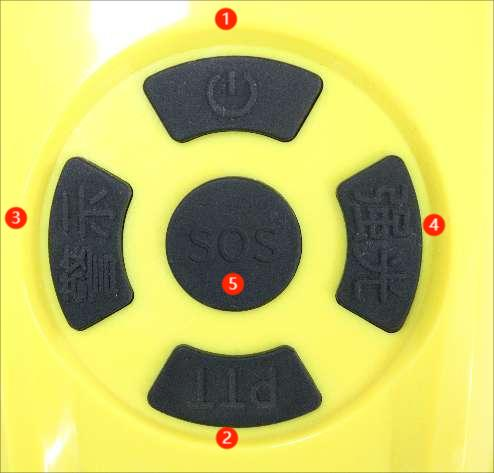
1. Power on/off: Long press the [Power on/off] button to turn off or on the device, accompanied by a voice prompt for power on/off, and automatically record video when turned on.
2. PTT button: Long press the PTT intercom function,.
3. Warning light: 3-speed cycle, off, click on red and blue flashing, then click on red and blue alternating flashing
4. Strong light: 3-speed cycle, off, click to keep on, then click to flash. 5. SOS button: Press the [SOS] button, and the background will receive an SOS alarm.
Interface Description

As shown in the above figure, the interfaces are SIM card slot, 3.5 headphone jack, running indicator light, Type-C interface, and charging indicator light.
SIM card insertion method: As shown in the figure above, the SIM card notch faces outward.
Expansion device
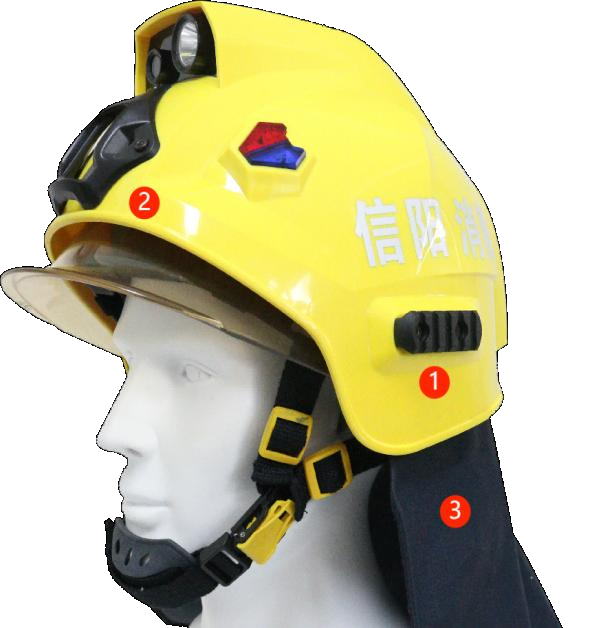
1. Guide rail
The helmet is equipped with standard rails on both sides, which can be expanded to accommodate flashlights and other accessories.
2. Dried squid
The helmet is equipped with standard dried squid and expandable night vision devices.
3. Shawl
The helmet is equipped with a fireproof and waterproof shawl, which can be quickly disassembled and installed.